

A cracked or damaged Chromebook screen can be frustrating, and the first question that comes to mind is — how much does it cost to fix a Chromebook screen? The repair cost typically ranges from $50 to $300, depending on your Chromebook model, the extent of the damage, and whether you choose a professional repair service or a DIY approach.
In this guide, we’ll break down everything you need to know, including signs your Chromebook screen needs repair and whether a warranty can cover Chromebook screen damage.
What Causes Chromebook Screen Damage?
Chromebook screens are delicate and can become damaged in many different ways. Physical accidents are the most common reason, especially when the laptop falls from a desk or gets squeezed inside a backpack. Even a small crack can spread over time and make the display difficult to use.
Sometimes the damage is internal instead of visible. Pressure on the lid, overheating, manufacturing defects, or faulty display cables may also cause screen problems. Students often experience Chromebook screen damage because school devices are carried around frequently and used daily.
Common causes include:
- Dropping the Chromebook
- Closing the lid with an object inside
- Water or liquid damage
- Excessive screen pressure
- Hardware or cable failure
- Overheating problems
Signs Your Chromebook Screen Needs Repair
A damaged Chromebook screen does not always mean the display is completely broken. In many cases, small warning signs appear before the screen stops working entirely. Recognizing these symptoms early may help prevent further damage and reduce repair costs.
Some users notice black spots, flickering, or colorful lines across the screen. Others may see cracked glass or dead pixels that make it difficult to read text properly. If your Chromebook screen becomes dim or unresponsive, repair may be necessary.
Common signs include:
| Problem | Description |
| Cracked Display | Visible cracks on the screen surface |
| Black Spots | Ink-like dark areas spreading on display |
| Flickering | Screen brightness changes repeatedly |
| Colored Lines | Vertical or horizontal lines appear |
| Blank Screen | Screen stays black even when powered on |
| Touch Issues | Touchscreen stops responding properly |
Average Cost to Fix a Chromebook Screen
If you are wondering how much does it cost to fix a Chromebook screen, the average repair price depends on the Chromebook model and repair method. Most standard Chromebook screen repairs cost between $80 and $180 for non-touch models.
Premium Chromebooks with touchscreens or high-resolution displays may cost between $200 and $350. Labor charges, replacement parts, and service location also affect the final repair bill.
Here is an estimated repair cost overview:
| Chromebook Type | Estimated Repair Cost |
| Basic Non-Touch Chromebook | $70 – $150 |
| Touchscreen Chromebook | $150 – $300 |
| Full HD Chromebook | $120 – $250 |
| Premium Chromebook Models | $250 – $400 |
In some situations, buying a new Chromebook may be cheaper than repairing an older device.
Chromebook Screen Repair Cost by Screen Type
Chromebook screen repair prices are different for each display type. Below we will discuss the repair cost of non-touch screens, touchscreen Chromebooks, and HD displays to help you understand the price differences more clearly.
Non-Touch Screen
Non-touch Chromebook screens are usually the cheapest to repair because the display technology is simpler. Most school Chromebooks and budget devices use standard LCD screens without touch functionality.
The repair cost for a non-touch screen usually falls between $70 and $150. If you replace the screen yourself, the total cost may be even lower because labor fees are removed.
Touchscreen Chromebook
Touchscreen Chromebooks are more expensive to repair because the display includes additional touch-sensitive layers. These screens require careful installation and often cost more to replace.
Most touchscreen Chromebook repairs range from $150 to $300 or higher. Premium models from brands like HP or Samsung may have even higher repair costs due to expensive parts.
HD and Full HD Displays
HD and Full HD Chromebook displays provide sharper image quality, but replacement screens are usually more expensive. High-resolution displays may require special compatible parts that increase the overall repair cost.
Depending on the Chromebook model, HD display repairs generally cost between $120 and $250. Devices with IPS panels or premium display technology may cost more.
Factors That Affect Chromebook Screen Repair Cost
Several important factors influence how much it costs to fix a Chromebook screen. Some repairs are simple and inexpensive, while others require costly replacement parts and professional labor.
The Chromebook brand is one of the biggest factors because premium models use more expensive displays. Touchscreen functionality, screen size, and screen resolution also affect repair pricing. Labor charges differ between repair shops and locations as well.
Other factors include:
- Availability of replacement parts
- Device age
- Warranty status
- Local repair labor cost
- Shipping fees for parts
- Severity of damage
DIY Chromebook Screen Repair Cost
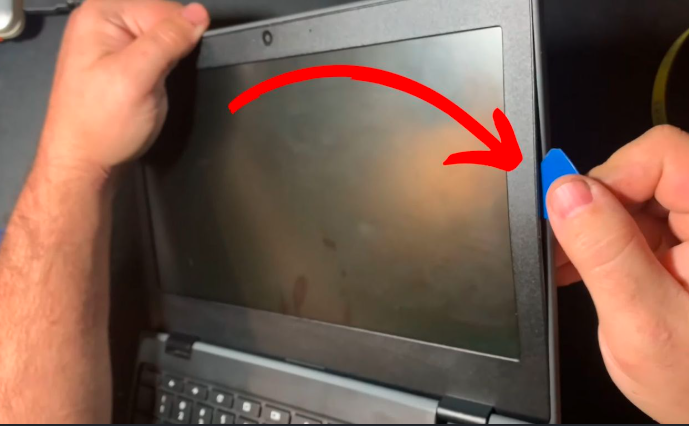
Many people choose DIY repair to save money on Chromebook screen replacement. Online stores sell replacement screens and repair kits for various Chromebook models, making self-repair possible for users with technical skills.
DIY Chromebook screen repair usually costs between $40 and $120 depending on the screen type. However, mistakes during installation can damage internal parts and create additional repair costs.
DIY repair may require:
- Replacement screen
- Screwdriver set
- Plastic pry tools
- Adhesive strips
- Online repair tutorial
If you are inexperienced with laptop repairs, professional service may be safer.
Professional Repair Service Cost
Professional repair services are more expensive than DIY repair, but they provide expert installation and reduce the risk of mistakes. Most repair shops charge both labor fees and replacement part costs.
Professional Chromebook screen repairs usually range between $100 and $300. Repair centers may also offer short-term warranties on replacement screens and labor work.
Advantages of professional repair include:
| Benefit | Explanation |
| Expert Installation | Lower risk of hardware damage |
| Faster Repair | Experienced technicians work quickly |
| Warranty Support | Some repairs include service guarantees |
| Proper Tools | Professional-grade repair equipment |
Chromebook Brands and Their Repair Costs
Different Chromebook brands use different screen technologies and hardware designs. Below we will discuss repair costs for popular Chromebook brands so you can estimate possible expenses more accurately.
Acer Chromebook
Acer Chromebooks are commonly used in schools because they are affordable and durable. Screen replacement costs are usually lower compared to premium brands.
Most Acer Chromebook screen repairs cost between $70 and $180 depending on the model and screen type.
HP Chromebook
HP Chromebooks often include touchscreen and Full HD display options, which can increase repair costs. Some premium HP models use expensive display panels.
Repair prices for HP Chromebook screens generally range from $120 to $300.
Lenovo Chromebook
Lenovo Chromebooks are known for business and education use. Basic Lenovo models are affordable to repair, while touchscreen versions cost more.
The average Lenovo Chromebook screen repair cost is around $80 to $250.
Samsung Chromebook
Samsung Chromebooks usually feature high-quality displays and slim designs. Replacement parts may cost more due to premium hardware.
Samsung Chromebook screen repairs often range from $150 to $350.
ASUS Chromebook
ASUS Chromebooks come in both budget and premium versions. Repair costs depend on display quality and touchscreen support.
Most ASUS Chromebook screen repairs cost between $90 and $250.
How Long Does Chromebook Screen Repair Take?
Chromebook screen repair time depends on part availability and repair complexity. Simple repairs may take less than an hour, while ordering replacement parts can delay the process for several days.
Local repair shops often complete repairs within one to three business days. DIY repairs may take longer if you are unfamiliar with laptop disassembly.
Factors affecting repair time include:
- Chromebook model
- Screen availability
- Repair shop workload
- Shipping delays
- Internal hardware damage
Can a Cracked Chromebook Screen Get Worse?
A small Chromebook screen crack can become much worse over time. Pressure, movement, and temperature changes may cause cracks to spread across the display.
Internal LCD damage can also grow gradually, leading to black spots, flickering, or complete display failure. Continuing to use a damaged screen may increase repair costs later.
It is best to repair the screen early before additional damage develops.
Common Chromebook Screen Problems
Chromebook screens can develop different issues besides physical cracks. Below we will discuss common display problems that users experience and what they may mean for repair needs.
Black Screen
A black screen may occur because of display failure, battery issues, motherboard problems, or damaged screen cables. Sometimes the Chromebook powers on normally but shows no image.
Restarting the Chromebook or connecting an external monitor may help identify the issue.
Flickering Screen
Screen flickering usually indicates loose display connections, software glitches, or failing screen hardware. Flickering may worsen gradually if left unrepaired.
Updating display drivers or replacing the screen cable may solve the problem.
Lines on Screen
Vertical or horizontal lines often appear after physical damage or LCD failure. These lines may block parts of the display and make the Chromebook difficult to use.
In many cases, replacing the screen is necessary to remove the lines completely.
Broken LCD
A broken LCD usually shows black spots, ink-like spreading damage, or shattered internal display layers. Even if the outer glass looks fine, the LCD underneath may still be damaged.
LCD replacement is typically the only permanent solution.
How to Protect Your Chromebook Screen From Damage?
Protecting your Chromebook screen can help you avoid expensive repairs in the future. Since Chromebook displays are fragile, careful handling is extremely important.
Using a protective laptop sleeve can reduce damage during travel. Avoid placing heavy objects on the Chromebook and never close the lid forcefully. Cleaning the screen gently with a microfiber cloth also helps maintain display quality.
Useful protection tips include:
- Use a padded carrying case
- Avoid eating or drinking near the Chromebook
- Keep sharp objects away from the keyboard
- Open and close the lid carefully
- Store the Chromebook safely
Tips to Save Money on Chromebook Screen Repair
Repairing a Chromebook screen can be expensive, but several methods may help reduce costs. Comparing repair prices from multiple shops is one of the easiest ways to save money.
DIY repair may also lower expenses if you have technical experience. In some cases, buying used replacement parts can reduce repair costs further.
Money-saving tips include:
| Tip | Benefit |
| Compare Repair Shops | Find lower labor costs |
| Use Warranty Coverage | Reduce or avoid repair fees |
| Buy Used Parts | Lower replacement costs |
| Repair Early | Prevent additional damage |
| Consider DIY Repair | Avoid technician labor fees |
Where to Buy Chromebook Replacement Screens?
Replacement Chromebook screens are available from many online electronics stores and repair websites. Choosing the correct screen model is extremely important because Chromebook displays vary by size and connector type.
Popular places to buy replacement screens include:
- Amazon
- eBay
- LaptopScreen
- ChromebookParts
- Local electronics repair stores
Always verify the Chromebook model number before purchasing a replacement display.
Can Warranty Cover Chromebook Screen Damage?
Most standard Chromebook warranties cover manufacturing defects but not accidental screen damage. If the screen cracked because of dropping or pressure damage, warranty coverage may not apply.
However, some extended protection plans include accidental damage coverage. School-issued Chromebooks may also have separate repair policies.
Before paying for repairs, check:
- Manufacturer warranty terms
- School device policies
- Extended protection plans
- Credit card purchase protection
School Chromebook Screen Repair Costs
School Chromebook repair costs vary depending on the district policy and device insurance coverage. Some schools charge fixed repair fees, while others require full replacement payment for severe damage.
Students may pay between $25 and $200 depending on the damage level and Chromebook model. Schools sometimes provide discounted repairs because they purchase parts in bulk.
Parents should review school technology agreements carefully to understand possible charges.
DIY vs Professional Repair Comparison Table
| Feature | DIY Repair | Professional Repair |
| Cost | Lower | Higher |
| Skill Needed | Moderate to High | No technical skill needed |
| Repair Time | Longer for beginners | Usually faster |
| Risk of Damage | Higher | Lower |
| Warranty Support | Usually none | Often included |
| Tools Required | Yes | No |
When You Should Replace the Entire Chromebook?
Sometimes replacing the Chromebook is a better financial decision than repairing it. Older Chromebooks with low performance may not be worth expensive screen repairs.
If repair costs are close to the price of a new Chromebook, replacement may provide better long-term value. Battery problems, motherboard issues, or outdated software support are also important factors to consider.
You should consider replacement if:
- Repair cost exceeds device value
- Chromebook is very old
- Multiple hardware problems exist
- Software updates are ending
- Performance is already slow
Frequently Asked Questions
How much does it cost to fix a Chromebook screen?
Most Chromebook screen repairs cost between $70 and $300 depending on the model, screen type, and repair method.
Is it cheaper to replace a Chromebook screen yourself?
Yes, DIY repair is usually cheaper because you avoid labor costs, but it requires technical knowledge and proper tools.
Can a Chromebook work with a cracked screen?
Some cracked screens still function temporarily, but the damage may worsen and eventually stop the display from working.
How long does Chromebook screen replacement take?
Professional repairs often take one to three days, while DIY repair time depends on experience and part availability.
Are touchscreen Chromebook repairs more expensive?
Yes, touchscreen displays cost more because they include additional hardware layers and expensive replacement parts.
Can overheating damage a Chromebook screen?
Excessive heat can affect internal display components and cables over time. While less common, overheating may contribute to screen malfunction.
How can I find my Chromebook screen model number?
You can usually find the model number on the back of the screen panel or in the Chromebook system information settings.
Final Thoughts
Understanding how much it costs to fix a Chromebook screen can help you make a smart repair decision. Screen repair costs vary based on the Chromebook brand, display type, and whether you choose DIY or professional service.
Basic Chromebook screen repairs are often affordable, but premium touchscreen models can become expensive to fix. Comparing repair costs, checking warranty coverage, and protecting your Chromebook carefully can help you save money and extend the device’s lifespan.