


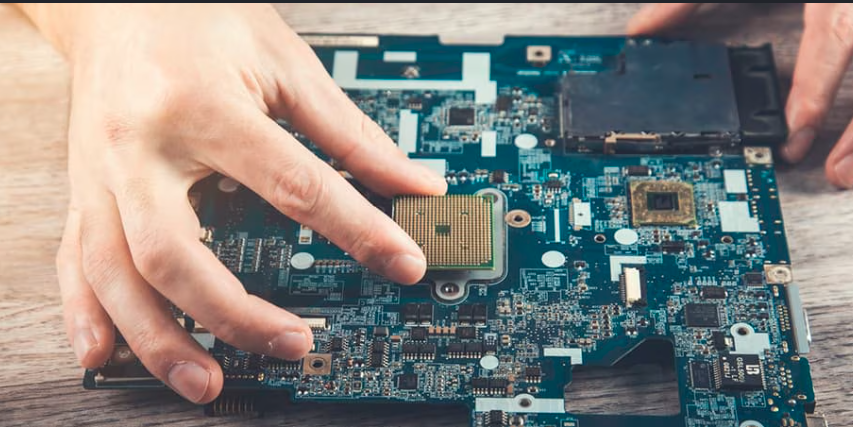
A laptop motherboard is the central circuit board that connects and powers every component of your device, making it the backbone of its entire operation. Understanding which statement is true of laptop motherboards helps users make informed decisions about repairs, upgrades, and purchases.
In this guide, we will discuss Common Components on a Laptop Motherboard and the Causes of Laptop Motherboard Failure to give you a complete picture of how this vital component works and what can go wrong.
What Is a Laptop Motherboard?
A laptop motherboard is the main circuit board inside a laptop that connects all hardware components together. It allows communication between the processor, memory, storage devices, display, battery, and cooling system.
The motherboard also controls power distribution and data transfer inside the laptop. Every laptop has a specially designed motherboard that fits its size, hardware configuration, and performance requirements.
Which Statement Is True of Laptop Motherboards?
The correct statement is that laptop motherboard form factors vary by manufacturer and are usually proprietary. This means companies design motherboards specifically for their laptop models instead of following one universal standard.
Unlike desktop motherboards that often use standard sizes like ATX or Micro-ATX, laptop motherboards are customized to fit thin and compact laptop bodies. Because of this, replacing a laptop motherboard with a different model is usually difficult or impossible unless it matches the exact laptop design.
| Feature | Laptop Motherboards | Desktop Motherboards |
| Size | Compact and custom | Standardized sizes |
| Interchangeability | Very limited | More flexible |
| Upgrade Options | Limited | Easier |
| Cooling Space | Small | Larger |
| Design | Proprietary | Standardized |
Understanding Laptop Motherboard Design
Laptop motherboard design focuses on compactness, power efficiency, and heat management. Manufacturers try to fit many components into a very small space while keeping the laptop lightweight and portable.
Modern laptop motherboards often include integrated processors, graphics chips, wireless modules, and power systems directly on the board. This design saves space but also makes repairs and upgrades more difficult.
Laptop Motherboard Form Factors Explained
Laptop motherboards do not follow universal form factor standards like desktop motherboards. Each company creates its own layout depending on laptop size, battery position, cooling system, and hardware arrangement.
Smaller laptops usually have very compact motherboards with tightly packed components, while gaming laptops may use larger boards to support stronger cooling systems and dedicated graphics cards. This is one major reason why the answer to “which statement is true of laptop motherboards” relates to manufacturer-specific designs.
Compact Design
Thin laptops use smaller motherboard layouts to save internal space. Manufacturers carefully place components to maximize battery and cooling efficiency.
Gaming Laptop Boards
Gaming laptops require larger cooling systems and high-performance hardware. Their motherboards often include advanced graphics chips and more power delivery circuits.
Ultrabook Motherboards
Ultrabook motherboards focus on energy efficiency and slim design. Many parts are soldered directly onto the board to reduce size.
Are Laptop Motherboards Interchangeable?
Laptop motherboards are usually not interchangeable because every manufacturer creates unique layouts for different laptop models. Even laptops from the same brand may use completely different motherboard designs.
The position of ports, screw holes, cooling systems, display connectors, and batteries can vary greatly. Because of this, users normally need the exact replacement motherboard designed for their laptop model.
Common Components on a Laptop Motherboard
Laptop motherboards contain many important components that work together to run the system properly. These parts help manage performance, storage, networking, graphics, and power.
Common motherboard components include:
- CPU socket or integrated CPU
- RAM slots or soldered memory
- GPU or integrated graphics chip
- BIOS chip
- Power management circuits
- Storage connectors
- Wi-Fi module
- USB and charging ports
- Audio controller
- Cooling fan connectors
All these components communicate through tiny electrical pathways built into the motherboard.
CPU and GPU Integration in Laptop Motherboards
Modern laptops often have CPUs and GPUs soldered directly onto the motherboard. This design improves space efficiency and reduces power consumption.
However, soldered processors and graphics chips make upgrading almost impossible. If one major component fails, the entire motherboard may need repair or replacement.
Integrated CPU
Many modern laptops use integrated processors permanently attached to the motherboard. This saves space and improves thermal efficiency.
Dedicated GPU Support
Gaming and professional laptops may include dedicated graphics chips for better performance in gaming, video editing, and 3D rendering tasks.
RAM and Storage Support
We will now discuss how laptop motherboards handle memory and storage options. The type of RAM and storage support depends on the motherboard design and laptop model.
RAM Configuration
Some laptops allow RAM upgrades through removable slots, while others use soldered RAM that cannot be replaced. Thin laptops often use soldered memory to reduce size.
Storage Connectors
Laptop motherboards may support SATA SSDs, NVMe SSDs, or traditional hard drives. Modern laptops mostly use NVMe storage because it offers much faster performance.
| Storage Type | Speed | Common Usage |
| HDD | Slow | Older laptops |
| SATA SSD | Medium | Budget laptops |
| NVMe SSD | Very Fast | Modern laptops |
Power Supply and Battery Management
Laptop motherboards include special circuits that manage battery charging and power distribution. These circuits help protect the battery from overheating and overcharging.
The motherboard also controls how power is shared between the processor, graphics chip, cooling fans, and connected devices. Efficient power management improves battery life and overall laptop performance.
Cooling Systems in Laptop Motherboards
Laptop cooling systems are closely connected to motherboard design. Since laptops have limited internal space, heat management becomes extremely important.
Motherboards include thermal sensors and fan controllers that regulate temperature during heavy workloads such as gaming or video editing.
Heat Pipes and Fans
Most laptops use copper heat pipes and cooling fans to remove heat from the CPU and GPU areas.
Thermal Paste
Thermal paste improves heat transfer between processors and cooling components. Poor thermal paste can cause overheating problems.
Ports and Connectivity Features
Laptop motherboards contain built-in connectors for external devices and communication features. These ports allow users to connect accessories, displays, storage drives, and internet connections.
Common connectivity features include USB ports, HDMI outputs, audio jacks, Bluetooth, Wi-Fi, and charging ports. Modern motherboards may also support Thunderbolt and USB-C technologies.
Common Laptop Motherboard Problems
Laptop motherboards can fail because of heat, electrical damage, liquid spills, or aging components. Since all hardware depends on the motherboard, failures can create serious system issues.
Common motherboard problems include:
- Laptop not powering on
- Random shutdowns
- Overheating
- Charging problems
- USB ports not working
- No display output
- Continuous beeping sounds
These problems may indicate damaged circuits or failed components.
Signs of a Damaged Laptop Motherboard
A damaged motherboard often shows warning signs before complete failure. Recognizing these symptoms early can help prevent further hardware damage.
Common signs include sudden freezing, blue screen errors, overheating, battery detection issues, or the laptop failing to start properly. Burn marks or unusual smells may also indicate motherboard damage.
Causes of Laptop Motherboard Failure
Laptop motherboards can fail due to several internal and external factors that affect their performance over time. Below are some of the most common causes of laptop motherboard failure explained in simple detail.
- Overheating: Overheating is one of the most common causes of laptop motherboard failure. When the cooling system — including fans and heat sinks — becomes clogged with dust or stops working properly, excessive heat builds up and damages the delicate circuits on the motherboard over time.
- Power Surges and Electrical Damage: Sudden voltage spikes or power surges can send excessive electrical current through the motherboard, burning out its components. Using a low-quality charger or plugging into an unstable power source significantly increases this risk.
- Physical Damage: Dropping your laptop, applying pressure to the body, or any form of physical impact can crack the motherboard or damage its solder joints. Even minor bends or flexes in the board can cause permanent circuit breaks.
- Liquid Spills: Water or any liquid spilled on a laptop can cause short circuits on the motherboard almost instantly. Even after drying, mineral deposits left behind by the liquid can continue to corrode the board’s components over time.
- Age and Wear: Like all electronic components, motherboards degrade naturally over time. Capacitors can swell or leak, solder joints weaken, and connectors wear out — all of which eventually lead to failure in older laptops.
How to Diagnose Motherboard Issues?
Diagnosing motherboard problems requires careful testing because many hardware issues can appear similar. Technicians usually inspect power circuits, RAM, processor behavior, and display output.
Basic troubleshooting methods include:
- Removing external devices
- Testing RAM modules
- Checking charging adapters
- Resetting BIOS settings
- Listening for beep codes
- Inspecting for burn damage
Professional diagnostic tools may also be needed for advanced motherboard repairs.
Can You Repair a Laptop Motherboard?
Many laptop motherboards can be repaired if the damage is limited to certain components such as capacitors, charging circuits, or ports. Skilled technicians use specialized tools to replace damaged parts.
However, severe damage involving the CPU, GPU, or multiple layers of the motherboard may make repair too expensive or impractical. In such cases, full replacement is often recommended.
Laptop Motherboard Replacement Process
Replacing a laptop motherboard requires careful disassembly because laptops contain many delicate internal parts. Technicians usually remove the battery, cooling system, storage drive, keyboard, and screen connectors before accessing the motherboard.
The replacement process also requires proper thermal paste application and hardware testing after installation. Using the wrong motherboard model can cause compatibility problems.
Cost of Replacing a Laptop Motherboard
Laptop motherboard replacement costs vary depending on the brand, hardware specifications, and availability of replacement parts. Gaming laptops and premium ultrabooks usually have more expensive motherboards.
| Laptop Type | Estimated Replacement Cost |
| Budget Laptop | $80 – $200 |
| Mid-Range Laptop | $200 – $400 |
| Gaming Laptop | $400 – $900 |
Labor charges may increase the final repair cost.
How to Find Your Laptop Motherboard Model?
You can identify your motherboard model using system information tools, BIOS menus, or physical labels inside the laptop. Knowing the exact motherboard model is important when ordering replacement parts.
Users can also search using the laptop model number because manufacturers often list compatible motherboard versions online.
Advantages of Modern Laptop Motherboards
Modern laptop motherboards offer better energy efficiency, faster storage support, improved wireless connectivity, and compact designs. They also support advanced processors and modern display technologies.
Benefits of modern laptop motherboards include:
- Better battery life
- Faster SSD performance
- Improved heat management
- Smaller laptop size
- Better wireless connectivity
- Support for modern processors
These improvements make modern laptops more powerful and portable than older systems.
FAQs
What is the main function of a laptop motherboard?
The motherboard connects all hardware parts and allows communication between CPU, RAM, storage, and other components to make the laptop work properly.
Can a laptop work with a damaged motherboard?
No, in most cases a damaged motherboard prevents the laptop from turning on or functioning normally.
Does using a laptop while charging damage the motherboard?
Normally it does not damage the motherboard if the charger is original, but poor-quality chargers can cause issues.
Is motherboard repair better than replacement?
It depends on damage level; minor issues can be repaired, but severe damage usually requires replacement.
Is motherboard failure common in laptops?
It is not very common, but it can happen due to heat, power issues, or physical damage over time.
Can external devices damage a motherboard?
Yes, faulty USB devices or power-hungry peripherals can sometimes overload circuits.
Is it safe to clean a laptop motherboard at home?
It is not recommended unless you have technical experience because improper cleaning can cause more damage.
Final Thoughts
Understanding which statement is true of laptop motherboards helps users learn why laptop hardware is different from desktop systems. Laptop motherboards are highly customized, compact, and designed specifically for individual laptop models. Their proprietary form factors improve portability and efficiency but also limit upgrade and replacement options.
Modern laptop motherboards continue to evolve with better cooling systems, faster storage technologies, and more efficient processors.