


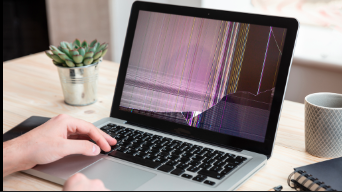
Introduction to Surface Laptop 3 Screen Issues
A surface laptop 3 cracked screen is one of the most frustrating problems users can face. The laptop is known for its premium build quality and sleek design, but like any glass-based device, its screen is vulnerable to damage. Even a small crack can quickly grow into a bigger issue, affecting both the display quality and touchscreen functionality.
When the screen is damaged, it not only impacts the visual experience but can also reduce productivity, especially for users who rely on touch input. Understanding the causes, solutions, and prevention methods is essential to handle this issue properly.
Overview of Surface Laptop 3 Display Technology
The Microsoft Surface Laptop 3 features a high-quality PixelSense touchscreen display. This display is designed to offer sharp visuals, accurate colors, and smooth touch responsiveness.
It comes in two sizes:
- 13.5-inch display
- 15-inch display
What makes this screen unique is its fused design, where the glass, touch digitizer, and LCD panel are combined into a single unit. While this improves display clarity and responsiveness, it also makes repairs more complicated. If the screen breaks, you cannot replace just the glass; the entire display assembly must be replaced.
What Does a Cracked Screen Mean?
A cracked screen refers to physical damage to the outer glass layer of the laptop display. However, in many cases, the damage goes beyond just the glass. It can also affect the internal display and touch sensors.
A surface laptop 3 cracked screen can result in:
- Visible cracks or lines
- Touch not responding
- Display distortion
Unlike software problems, this is a hardware issue. That means no software fix, reset, or update can repair it. Replacement is usually the only solution.
Common Causes of Surface Laptop 3 Screen Cracks
Screen damage can happen due to several everyday situations. Many users don’t realize how easily pressure or impact can affect a thin laptop screen.
Some of the most common causes include:
- Dropping the laptop accidentally
- Placing heavy objects on top of it
- Carrying it in a tight bag with pressure
- Closing the lid with small items like pens or earbuds inside
- Sudden temperature changes causing stress on the glass
In rare cases, users have also reported hairline cracks appearing without clear impact, but these situations are uncommon.
Types of Screen Damage Explained
Not all cracks are the same. Understanding the type of damage helps determine how serious the problem is.
Hairline Cracks:
These are very thin cracks that may not immediately affect the display but can spread over time.
Spiderweb Cracks:
These cracks spread across the screen like a web and usually indicate significant impact.
Black Spots or Bleeding:
This happens when the internal LCD is damaged, causing dark areas or ink-like spreading on the screen.
Touch Failure:
Sometimes the display looks fine, but touch stops working due to damage to the digitizer layer.
Signs and Symptoms of a Damaged Screen
A cracked screen does not always look severe at first. However, there are several signs that indicate underlying damage.
You may notice:
- Flickering or unstable display
- Horizontal or vertical lines
- Discoloration or faded areas
- Unresponsive touchscreen
- Bright or dark patches
These symptoms often worsen over time if the screen is not replaced.
Can a Cracked Screen Be Repaired?
In most cases, a surface laptop 3 cracked screen cannot be repaired, only replaced. This is because of the fused display structure.
Unlike older laptops where only the glass could be replaced, modern Surface devices require full display assembly replacement. This includes:
- Glass layer
- Touch sensor
- LCD panel
Therefore, repair essentially means installing a completely new screen unit.
Surface Laptop 3 Screen Replacement Process
Replacing the screen is a technical process that requires precision. It involves several steps:
- Carefully opening the laptop body
- Disconnecting the battery to avoid electrical damage
- Removing the damaged display assembly
- Installing a new screen unit
- Reassembling and testing the device
This process is delicate because the internal components are tightly packed, and any mistake can damage the motherboard or connectors.
Professional Repair vs DIY Repair
Professional Repair
Professional repair is the safest option. Technicians have the right tools and experience to handle delicate components. It also reduces the risk of further damage.
DIY Repair
DIY repair may seem cost-effective, but it comes with risks. Surface laptops are not designed for easy repair, and opening them requires skill. One wrong move can make the problem worse.
Cost of Repairing a Surface Laptop 3 Screen
The cost of fixing a surface laptop 3 cracked screen depends on where and how you get it repaired.
| Repair Option | Estimated Cost Range | Details |
|---|---|---|
| Official Service | High | May involve full device replacement |
| Third-Party Repair | Medium | More affordable but varies by location |
| DIY Replacement | Medium | Cost of screen + tools |
The high cost is mainly due to the premium touchscreen technology and integrated design.
Warranty and Microsoft Repair Policy
Standard warranties usually do not cover accidental damage such as a cracked screen. However, if you have extended protection like accidental damage coverage, you may be eligible for repair or replacement.
It is always recommended to check your warranty status before paying for repairs.
Temporary Solutions Before Repair
If immediate repair is not possible, you can still use your laptop with some adjustments.
- Connect to an external monitor
- Lower screen brightness to reduce strain
- Avoid touching the cracked area
These are temporary solutions and do not fix the problem.
Risks of Using a Cracked Screen
Using a damaged screen can lead to further complications.
- Cracks may spread and worsen
- Touch functionality may stop completely
- Internal damage can increase
- Small glass fragments can pose a safety risk
Ignoring the issue for too long can make repair more expensive.
How to Prevent Screen Damage in the Future
Prevention is always better than repair. A few careful habits can protect your device.
- Use a protective laptop sleeve
- Avoid placing heavy objects on it
- Clean the keyboard before closing the lid
- Handle the laptop gently
These small steps can significantly reduce the risk of damage.
When to Repair vs Replace the Laptop
Deciding whether to repair or replace depends on several factors.
If the repair cost is close to the price of a new laptop, replacement may be a better option. However, if the device is still powerful and meets your needs, repairing it can extend its life.
Tips for Choosing a Repair Service
Choosing the right repair service is important for quality results.
Look for:
- Experienced technicians
- Good customer reviews
- Warranty on repair
- Use of genuine parts
A reliable repair service ensures long-term performance.
Frequently Asked Questions (FAQs)
1. Can I fix a surface laptop 3 cracked screen without replacing it?
No, replacement is usually required due to the fused display design.
2. How much does it cost to replace the screen?
Costs vary but are generally moderate to high depending on the repair method.
3. Is it safe to use a cracked screen?
It can be used temporarily, but it is not recommended for long-term use.
4. How long does screen replacement take?
Professional repair usually takes a few hours to a couple of days.
5. Does warranty cover screen cracks?
Standard warranty does not cover accidental damage unless you have additional coverage.
Conclusion
A surface laptop 3 cracked screen is a serious issue that requires timely attention. Since the display is integrated, replacement is the only reliable solution. While repair costs can be high, ignoring the problem can lead to even greater damage.
Understanding the causes, repair options, and preventive measures can help you make informed decisions and protect your device in the future.